
Get quick access to the latest cigar deals, giveaways and community updates. No App Store download is required.
- Open Safari
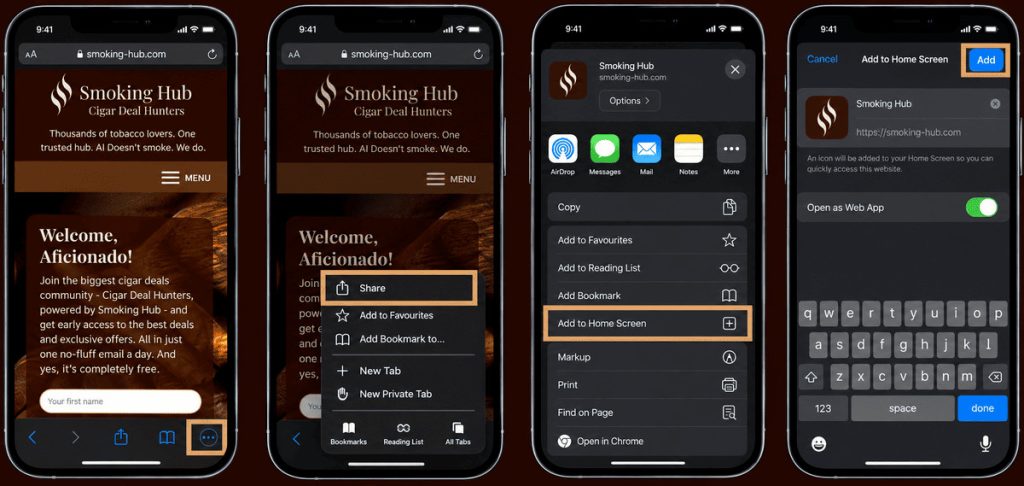
Launch Safari on your iPhone and visit smoking-hub.com. - Open the Share menu
Tap the three-dot menu at the bottom of the screen, then select Share. If your version of Safari displays the Share icon directly, simply tap it. - Select “Add to Home Screen”
Scroll down through the available options and tap Add to Home Screen. - Confirm the installation
Make sure Open as Web App is enabled, then tap Add in the top-right corner. - The Smoking Hub icon will appear on your Home Screen and open just like a regular app.
- Open the Smoking Hub web app from your Home Screen, come back to this page and press the Subscribe button below. It has to be done via the app and not just refreshing this page (Apple rules, not ours).
Can’t find “Add to Home Screen”? Scroll to the bottom of the Share menu, tap Edit Actions and add it from there.
Watch the Video Tutorial:
Need a visual walkthrough? Watch this short video showing how to add a website to your iPhone’s Home Screen:
Have Issues or Feedback?
Tell us how we can help you, what could be better or what’s missing in Support & Feedback.